LLM disclosure: I wrote the draft and proofread the final text. AI helped polish the language.
While reading An Invitation to Applied Category Theory, I became interested in the categorical representation of databases in Chapter 3. I wanted to edit a schema directly in a category diagram and inspect its tables and data. I could not find a tool that quite matched what I had in mind, so I started building Schema Explorer.
Topos Institute’s Changing the frame essays, Part 1 and Part 2, then led me to explore data migration: how should existing data move when a schema changes, and how can users review those choices?
1 A Categorical View of Databases
This article uses the database formulation in Chapter 3 of An Invitation to Applied Category Theory.
Schemas and path equations
A schema is a small category presented by objects, generating arrows, and path equations. Given a finite graph G and a finite set R of equations between parallel paths:
Objects and generating arrows describe the structure. Path equations specify which paths represent the same morphism.
Instances and the instance category
An instance is a functor I. Instances and their natural transformations form the instance category:
I assigns a set to each object and a function to each arrow, satisfying the schema’s path equations.
Schema mappings and migration
A schema mapping is a functor F that maps objects to objects and generating arrows to paths, preserving path equations. Precomposition induces Δ in the opposite direction:
Δ has both a left and a right adjoint:
2 PoC Design and Implementation
In my database design work, I usually start with a representative, reusable golden dataset. I use it to compare schema designs and check how the data fits and migrates.
Schema Explorer follows this workflow: import CSV files, edit the schema, configure a migration, and inspect the result. You can try it at schema-explorer.luo.sx, where Tutorial opens a guided Bookshop example. The source is on GitHub.
Features
-
Visual category editing: edit objects, arrows, path equations, and names.
-
Tables view: inspect the tables, fields, references, and data corresponding to the same model.
-
CSV data and migrations: import data and configure how it moves to the new schema.
-
Preview and results: review schema changes and inspect the migrated tables and references.
-
History: save checkpoints and continue exploring from an earlier version.
-
LLM assistance: review suggestions for schema changes and migration parameters.
One model and two views
The Category view shows objects, arrows, and path equations; the Tables view shows their database representation. Both use the same model and stable object identifiers.
Schema edits define the target structure. Migration declarations specify how existing data moves into it.
Technology stack and division of work
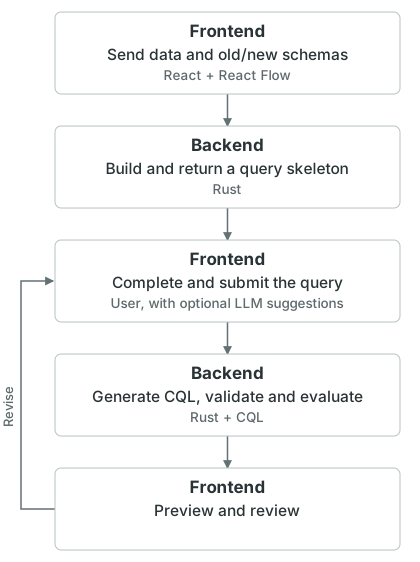
The frontend uses React and React Flow. The Rust backend handles requests, builds migration programs, and calls CQL in a JVM. OpenAI ChatGPT Sol 6.1 provides suggestions through the schema editor and migration configuration interface.
The frontend sends the data and the old and new schemas to the backend. Rust returns a query skeleton with the unresolved mappings. The user fills these in, optionally with LLM suggestions, and submits the completed declaration. Only then does the backend generate a CQL program and use CQL to validate and evaluate it. The result returns to the frontend for preview.
Review and history
Users review the schema diff before migration and inspect the resulting tables and references afterwards. Keeping the same golden dataset makes it easier to compare different designs.
Checkpoints preserve earlier models and data. Each migration is bound to the source revision and schema and data hashes; stale results are rejected before they can replace the current checkpoint.
LLM assistance and two layers of validation
The LLM proposes schema changes and migration parameters from the current schema, data summaries, and optional user guidance. It uses the same editing and configuration interfaces as manual input. The backend generates executable migration programs.
Suggestions pass two layers of validation:
-
Output format: check the structured output for required fields, parameter types, and referenced identifiers.
-
Model and migration: the frontend checks model structure; CQL type-checks the query and checks the supported path equations. The completed migration is then evaluated on the dataset.
A valid query can still express the wrong business choice. The user reviews the proposed mappings and resulting data.
Relation to existing tools
dbdiagram and EASIK already provide schema diagrams and SQL generation. CQL provides formal data migration computation, while CatColab brings formal models, instances, and analyses into a collaborative modeling environment.
My focus here is on editing a schema, supplying the migration choices that the graph leaves open, and checking the result on the same dataset.
3 Design Tradeoffs and Future Work
From fixed operations to migration declarations
I first tried using CQL to precompute SQL implementations of PRISM-style operations such as CREATE TABLE and DROP TABLE, then compose them into migrations.
In my prototype, assigning a fixed migration to each structural edit made business-specific choices awkward to express. Adding a department reference, for example, still leaves a choice of matching fields or an existing path. I needed users to supply these choices for each migration, so I moved them into a declaration that the backend compiles to CQL.
CQL integration and result transfer
The Rust service keeps a prewarmed Java process for CQL to avoid starting a JVM for every request. Each request gets a fresh CQL environment. This reduces startup overhead but requires process supervision, task isolation, and error handling.
The current migration path computes the full result in the backend and sends it to the browser. This works for small datasets, but computation and transfer costs grow with the data. Running the generated CQL program elsewhere also requires the CQL runtime.
The existing SQL exporter covers a limited set of recorded edits. It does not yet translate a CQL migration into a reusable SQL script; that remains future work.
Future work
-
Tables editing: support table, field, and reference edits in the Tables view, with corresponding changes in Category.
-
Migration configuration: support more field derivations, matching rules, and entity extraction, with clearer parameter forms.
-
SQL export for CQL migrations: compile supported migrations into reusable SQL scripts or parameterized templates that run in the target database, for use on larger datasets or in production.
-
Database connections: import schemas and sample data from existing databases, and check database versions and migration preconditions before execution.
-
Larger datasets: reduce full-data transfers with on-demand previews, pagination, or streaming, and explore running computation closer to the source.
-
More constraint types: support constraints beyond path equations, such as surjectivity, and validate them against instance data.